P Tanner

Blog

  • Where did all the vowels go?

    Back in the early days of smartphones, Apple took the branding path of adding a lowercase ‘i’ to the front of everything. iPods, iPads, iPhones, iMacs – there became a proliferation of additional vowels for no good reason I could ever quite fathom.

    It felt like an attempt at a bit of counter-culture, as everyone else was on a disemvoweling run – remember Flickr, twttr (oh the heady days!), Tumblr, and Scribd?

    Anyway, the reason why I’m on this current reminisce, is because I was looking for a way to receive Nagios notifications on my phone nice & easily, something like an SMS (acronym, not disemvoweling in this case) – but without the associated costs, or a mobile app. I honestly toyed for a while with the idea of writing my own Android app, and learning yet another set of programming languages and protocols – and then I randomly came across ntfy.sh – and everything was suddenly SO. MUCH. SIMPLER!

    The docker-compose.yaml file for setting up my own personal ntfy.sh server is insanely simple:

    services:
      ntfy:
        container_name: ntfy
        hostname: ntfy
        image: binwiederhier/ntfy
        command:
          - serve
        environment:
          - TZ=Pacific/Auckland
        volumes:
          - ./var-cache-ntfy:/var/cache/ntfy
          - ./etc-ntfy:/etc/ntfy
        ports:
          - 8000:80
        restart: unless-stopped

    And that was it done. The ntfy.sh Android app is small, and does exactly what I need (aforementioned iOS devices have their own one – but I can’t comment on that version) – which is to alert me to new notifications as soon as they arrive.

    The next step was to write a Bash script to handle Nagios notifications and feed them out to my new ntfy.sh server. This one’s a bit bigger than others I’ve shared so far, because it’s doing a few things to make things pretty at the receiving end:

    #!/usr/bin/env bash
    
    # notify_via_ntfy.sh — Nagios script for sending alerts to Nagios
    # Nagios macros available; https://assets.nagios.com/downloads/nagioscore/docs/nagioscore/3/en/macrolist.html
    #
    # -----------------------------------------------------------------------------
    # Description:
    #   This script takes a generated notification from Nagios, and sends it to a
    #   ntfy.sh endpoint, while auto-tagging with tags, emoji, and priority based
    #	on the values passed.
    #
    # Example usage:
    #   ./notify_via_ntfy.sh \
    #	 --notification-type "TEST" \
    #	 --state "TEST" \
    #	 --host "Example hostname" \
    #	 --service "Test service description"
    #	 --endpoint "http://127.0.0.1:8000/nagiosNotifications" \
    #	 --output "Test output" \
    #	 --timestamp "1970-01-01T00:00:00+0"
    # 
    # Example commands.cfg definition
    # 	define command {
    # 		command_name	notify-host-by-ntfy
    # 		command_line	$USER2$/notify_via_ntfy.sh \
    # 					--notification-type "$NOTIFICATIONTYPE$" \
    # 					--state "$HOSTSTATE$" \
    # 					--host "$HOSTNAME$" \
    # 					--endpoint "$USER3$" \
    # 					--output "$HOSTOUTPUT$ $LONGHOSTOUTPUT$" \
    # 					--timestamp "$LONGDATETIME$"
    # 	}
    # 	define command {
    # 		command_name	notify-service-by-ntfy
    # 		command_line	$USER2$/notify_via_ntfy.sh \
    # 					--notification-type "$NOTIFICATIONTYPE$" \
    # 					--state "$SERVICESTATE$" \
    # 					--host "$HOSTNAME$" \
    # 					--service "$SERVICEDESC$" \
    # 					--endpoint "$USER3$" \
    # 					--output "$SERVICEOUTPUT$ $LONGSERVICEOUTPUT$" \
    # 					--timestamp "$LONGDATETIME$"
    # 	}
    #
    # -----------------------------------------------------------------------------
    # Requirements:
    #   • bash 4.x or later (uses associative arrays)
    #   • curl
    #
    # -----------------------------------------------------------------------------
    # Author:		Phil Tanner <phil@philtanner.com>
    # Created:		2026-08
    # Last updated: 	2026-08-21
    #
    # Licence: (MIT licence: https://mit-license.org/)
    # Copyright © 2026 Phil Tanner
    #
    # Permission is hereby granted, free of charge,  to any person obtaining a copy
    # of this software and associated documentation files (the “Software”), to deal
    # in the Software without restriction,  including without limitation the rights
    # to use, copy,  modify, merge,  publish, distribute,  sublicense,  and/or sell 
    # copies of  the  Software,  and to  permit  persons to  whom  the  Software is
    # furnished to do so, subject to the following conditions:
    #
    # The above  copyright notice  and this permission notice shall  be included in
    # all copies or substantial portions of the Software.
    #
    # THE SOFTWARE IS PROVIDED “AS IS”,  WITHOUT  WARRANTY OF ANY KIND,  EXPRESS OR
    # IMPLIED,  INCLUDING  BUT NOT  LIMITED TO THE  WARRANTIES OF  MERCHANTABILITY,
    # FITNESS FOR  A PARTICULAR PURPOSE  AND NONINFRINGEMENT.  IN  NO  EVENT  SHALL
    # THE AUTHORS OR COPYRIGHT HOLDERS BE LIABLE  FOR ANY  CLAIM,  DAMAGES OR OTHER
    # LIABILITY,  WHETHER IN  AN ACTION  OF CONTRACT,  TORT  OR OTHERWISE,  ARISING
    # FROM,  OUT  OF  OR  IN  CONNECTION  WITH  THE  SOFTWARE OR THE  USE  OR OTHER
    # DEALINGS IN THE SOFTWARE.
    #
    # -----------------------------------------------------------------------------
    # Version: 1.0.0
    # -----------------------------------------------------------------------------
    #
    # -----------------------------------------------------------------------------
    # TODO:
    #   • nothing \o/
    # 
    # -----------------------------------------------------------------------------
    
    set -euo pipefail
    # Default allow spaces in filenames/paths without quoting (just in case)
    IFS=$'\n\t'
    
    
    # Standard Nagios plugin return codes.
    NAGIOS_STATUS_OK=0
    NAGIOS_STATUS_WARNING=1
    NAGIOS_STATUS_CRITICAL=2
    NAGIOS_STATUS_UNKNOWN=3
    
    # Variables for the outcome
    NOTIFICATIONTYPE=""
    HOSTNAME=""
    STATE=""
    ENDPOINT=""
    ALERTTYPE="host"
    OUTPUT=""
    TIMESTAMP=""
    SERVICE=""
    BODY=""
    
    usage()
    {
    	echo "NAME"
    	echo "	$0"
    	echo "SYNOPSIS"
    	echo "	$0 "
    	echo "DESCRIPTION"
    	echo "	This script is a wrapper to send Nagios alerts to a"
    	echo "	ntfy.sh endpoint, designed to be configured for host"
    	echo "	or service level alerts, and have some standardised"
    	echo "	emoji/tags based on the values passed."
    	echo "	The options are as follows:"
    	echo "		--notification-type <type>"
    	echo "			The type of notification. This should be the"
    	echo "			value held by the \$NOTIFICATIONTYPE\$ value."
    	echo "			Valid options:"
    	echo "			https://assets.nagios.com/downloads/nagioscore/docs/nagioscore/3/en/macrolist.html#notificationtype"
    	echo "		--host <name>"
    	echo "			The name of the host as the source of the"
    	echo "			notification. Needed for host and service"
    	echo "			notification types."
    	echo "		--state <state>"
    	echo "			The state of the host, or the service. Valid"
    	echo "			options can be either a service state:"
    	echo "			https://assets.nagios.com/downloads/nagioscore/docs/nagioscore/3/en/macrolist.html#servicestate"
    	echo "			Or a host state:"
    	echo "			https://assets.nagios.com/downloads/nagioscore/docs/nagioscore/3/en/macrolist.html#hoststate"
    	echo "			depending upon the value of [type] argument"
    	echo "		--endpoint <uri>"
    	echo "			The ntfy.sh server and topic you want to send"
    	echo "			notifications to."
    	echo "		--output '<content>'"
    	echo "			The output from the Nagios check. This will be"
    	echo "			in the body of the ntfy message. Usually this"
    	echo "			would expect to be either one of the Nagios macros"
    	echo "			\$HOSTOUTPUT\$ or \$SERVICEOUTPUT\$"
    	echo "		--timestamp '<timestamp>'"
    	echo "			You can use the \$LONGDATETIME\$ macro here"
    	echo "		--service '<name>'"
    	echo "			The name of the service generating the notification"
    	echo "			NOTE: Optional."
    	echo "			  If not defined, the script assumes this is a"
    	echo "			  notification about a host, NOT about a service."
    	exit "${1:-$NAGIOS_STATUS_UNKNOWN}"
    }
    
    dedupe_csv()
    {
    	local csv="$1"
    	local item
    
    	local -a items=()
    	local -A seen=()
    	local -a unique=()
    
    	IFS=',' read -ra items <<< "$csv"
    
    	for item in "${items[@]}"; do
    		if [[ -z "${seen[$item]+x}" ]]; then
    			seen[$item]=1
    			unique+=("$item")
    		fi
    	done
    
    	IFS=','
    	printf '%s' "${unique[*]}"
    }
    
    require_arg()
    {
    	if [[ $# -lt 2 || -z "$2" ]]; then
    		echo "UNKNOWN - Option $1 requires an argument"
    		exit $NAGIOS_STATUS_UNKNOWN
    	fi
    }
    
    while [[ $# -gt 0 ]]; do
    	case "$1" in
    		--notification-type)
    			require_arg "$@"
    			NOTIFICATIONTYPE="$2"
    			shift 2
    			;;
    		--host)
    			require_arg "$@"
    			HOSTNAME="$2"
    			shift 2
    			;;
    		--state)
    			require_arg "$@"
    			STATE="$2"
    			shift 2
    			;;
    		--endpoint)
    			require_arg "$@"
    			ENDPOINT="$2"
    			shift 2
    			;;
    		--output)
    			require_arg "$@"
    			OUTPUT="$2"
    			shift 2
    			;;
    		--timestamp)
    			require_arg "$@"
    			TIMESTAMP="$2"
    			shift 2
    			;;
    		--service)
    			SERVICE="$2"
    			ALERTTYPE="service"
    			shift 2
    			;;
    		--help|-h)
    			usage "$NAGIOS_STATUS_OK"
    			;;
    		*)
    			echo "UNKNOWN - Unknown argument: $1"
    			usage
    			;;
    	esac
    done
    
    # Sense-check our variables
    if [[ -z "$NOTIFICATIONTYPE" ]]; then
    	echo "UNKNOWN - Notification type not specified"
    	exit $NAGIOS_STATUS_UNKNOWN
    fi
    if [[ -z "$HOSTNAME" ]]; then
    	echo "UNKNOWN - Host not specified"
    	exit $NAGIOS_STATUS_UNKNOWN
    fi
    if [[ -z "$STATE" ]]; then
    	echo "UNKNOWN - State not specified"
    	exit $NAGIOS_STATUS_UNKNOWN
    fi
    if [[ -z "$ENDPOINT" ]]; then
    	echo "UNKNOWN - Endpoint not specified"
    	exit $NAGIOS_STATUS_UNKNOWN
    fi
    if [[ "$ALERTTYPE" == "service" && -z "$SERVICE" ]]; then
    	echo "UNKNOWN - Service not specified"
    	exit $NAGIOS_STATUS_UNKNOWN
    fi
    
    
    if [[ "${ALERTTYPE}" = "host" ]]; then
    	TAGS="nagios,computer"
    
    	# Host states: 	"UP", "DOWN", or "UNREACHABLE". 
    	case $STATE in
    		UP)
    			TAGS="${TAGS},white_check_mark"
    			;;
    		DOWN)
    			TAGS="${TAGS},x"
    			;;
    		UNREACHABLE)
    			TAGS="${TAGS},grey_question"
    			;;
    		TEST)
    			TAGS="${TAGS},hammer_and_wrench"
    			;;
    		*)
    			echo "UNKNOWN - state not specified, or unknown value. Check if it is a host state."
    			echo "https://assets.nagios.com/downloads/nagioscore/docs/nagioscore/3/en/macrolist.html#hoststate"
    			exit $NAGIOS_STATUS_CRITICAL
    			;;
    	esac
    	TITLE="${NOTIFICATIONTYPE} '${HOSTNAME}' ${STATE}"
    
    elif [[ "${ALERTTYPE}" = "service" ]]; then
    	TAGS="nagios,gear"
    
    	# Service states: "OK", "WARNING", "UNKNOWN", or "CRITICAL"
    	case $STATE in
    		OK)
    			TAGS="${TAGS},white_check_mark"
    			;;
    		WARNING)
    			TAGS="${TAGS},warning"
    			;;
    		UNKNOWN)
    			TAGS="${TAGS},grey_question"
    			;;
    		CRITICAL)
    			TAGS="${TAGS},x"
    			;;
    		TEST)
    			TAGS="${TAGS},hammer_and_wrench"
    			;;
    		*)
    			echo "UNKNOWN - state not specified, or unknown value. Check if it is a service state."
    			echo "https://assets.nagios.com/downloads/nagioscore/docs/nagioscore/3/en/macrolist.html#servicestate"
    			exit $NAGIOS_STATUS_CRITICAL
    			;;
    	esac
    
    	TITLE="${NOTIFICATIONTYPE} '${HOSTNAME}:${SERVICE}' ${STATE}"
    	BODY="  
    
    **Service:**  
    ${SERVICE}"
    
    fi
    
    
    # https://assets.nagios.com/downloads/nagioscore/docs/nagioscore/3/en/macrolist.html#notificationtype
    case $NOTIFICATIONTYPE in
    	PROBLEM)
    		STATUS_ICON="arrow_heading_down"
    		PRIORITY=5
    		;;
    	RECOVERY)
    		STATUS_ICON="arrow_heading_up"
    		PRIORITY=4
    		;;
    	ACKNOWLEDGEMENT)
    		STATUS_ICON="raising_hand"
    		PRIORITY=2
    		;;
    	FLAPPINGSTART)
    		STATUS_ICON="arrow_up_down"
    		PRIORITY=3
    		;;
    	FLAPPINGSTOP)
    		STATUS_ICON="ballot_box_with_check"
    		PRIORITY=3
    		;;
    	FLAPPINGDISABLED)
    		STATUS_ICON="no_entry_sign"
    		PRIORITY=2
    		;;
    	DOWNTIMESTART)
    		STATUS_ICON="clock10"
    		PRIORITY=1
    		;;
    	DOWNTIMEEND)
    		STATUS_ICON="clock2"
    		PRIORITY=1
    		;;
    	DOWNTIMECANCELLED)
    		STATUS_ICON="clock6"
    		PRIORITY=1
    		;;
    	TEST)
    		STATUS_ICON="hammer_and_wrench"
    		PRIORITY=1
    		;;
    
    	*)
    		echo "UNKNOWN - notification type not specified, or unknown value"
    		exit $NAGIOS_STATUS_CRITICAL
    		;;
    esac
    TAGS="${TAGS},${STATUS_ICON}"
    
    # Remove any doubled up tags
    TAGS=$(dedupe_csv "$TAGS")
    
    BODY="**Additional Info:**  
    ${OUTPUT}  
    
    **Notification Type:**  
    ${NOTIFICATIONTYPE}  
    
    **Hostname:**  
    ${HOSTNAME}  
    
    **Status:**  
    ${STATE}${BODY}  
    
    **Date:**  
    ${TIMESTAMP}"
    
    # Send our notification out to our ntfy.sh endpoint
    CURL_ERROR=$(mktemp)
    if HTTP_STATUS=$(
    	/usr/bin/curl \
    		--write-out '%{http_code}' \
    		--output /dev/null \
    		--silent \
    		--show-error \
    		-w '%{http_code}' \
    		-H "Title: ${TITLE}" \
    		-H "Priority: ${PRIORITY}" \
    		-H "X-Tags: ${TAGS}" \
    		-H "X-Markdown: yes" \
    		-d "${BODY}" \
    		"$ENDPOINT" \
    		2>"$CURL_ERROR"
    ); then
    
    	if [[ "$HTTP_STATUS" =~ ^2[0-9][0-9]$ ]]; then
    		rm -f "$CURL_ERROR"
    		exit $NAGIOS_STATUS_OK
    	else
    		echo "UNKNOWN - curl failed: $(<"$CURL_ERROR")"
    		rm -f "$CURL_ERROR"
    		exit $NAGIOS_STATUS_UNKNOWN
    	fi
    
    else
    	echo "UNKNOWN - curl failed to contact ntfy"
    	exit $NAGIOS_STATUS_UNKNOWN
    fi
    
    rm -f "$CURL_ERROR"
    
    # If we've gotten here, we did something wrong since we should've handled everything above
    echo 'Script failed, manual intervention required.'
    exit $NAGIOS_STATUS_UNKNOWN

    In the comments at the top of the bash script, you can see the definitions that need to be added to the Nagios commands.cfg file. I have also stored the URL for my ntfy.sh server as $USER3$ in my resource.cfg file (and $USER2$ points to my custom scripts location for Nagios – which I think is the default).

    Now I can receive Nagios alerts direct to my mobile phone, pretty much instantaneously. And find out whether or not the Pentagon has just ordered a bucket load of pizza….


    Fediverse reactions
  • How do you know when you’ve run out of invisible ink?

    So last week, I shared my Nagios script for checking the pizza orders around the Pentagon and the Whitehouse – and this week, I thought I’d share another of my customised Nagios plugins – again based on scraping the content of a webpage.

    It came about because I needed to print something, and the shitty HP inkjet printer we’ve got (seriously, never buy an HP inkjet printer. Never) had run out of ink. You can check the ink levels on the printer LCD itself, or even on the HTTP web page that the printer allows you to scan from – or you can even install a custom HP application on your Windows PC to no doubt keep track of these things. But there’s no way I’m installing that HP bloatware, I’ve made that mistake previously and been inundated with special offers, adverts, sales, and other gumph. All I really care about is “can my printer print?”, so I spent a bit of time poking through the served pages to find if I could easily access the toner levels, and low and behold, I found it.

    I now have a Nagios check for my printer ink levels, which works as well as the shitty Windows app they wanted me to install, and doesn’t try to force me into their bloody awful Instant Ink service. I have no idea if it will be of any use at all to anyone else, but on the off-chance it might be, knock yourself out:

    #!/usr/bin/env bash
    
    # check_hp_printer_cartridge.sh - Monitor HP inkjet printer cartidge levels
    #
    # -----------------------------------------------------------------------------
    # Description:
    #   This script checks the toner cartridge levels for my HP inkjet printer
    #   (which is an "HP ENVY Inspire 7900e All-in-One Printer series", FWIW).
    #
    # Example usage:
    #   ./check_hp_printer_cartridge.sh -H 192.168.0.2
    # 
    # -----------------------------------------------------------------------------
    # Requirements:
    #   • bash
    #   • wget
    #
    # -----------------------------------------------------------------------------
    # Author:		Phil Tanner <phil@philtanner.com>
    # Created:		2026-08-29
    # Last updated:	2026-08-29
    #
    # Licence: (MIT licence: https://mit-license.org/)
    # Copyright © 2026 Phil Tanner
    #
    # Permission is hereby granted, free of charge,  to any person obtaining a copy
    # of this software and associated documentation files (the “Software”), to deal
    # in the Software without restriction,  including without limitation the rights
    # to use, copy,  modify, merge,  publish, distribute,  sublicense,  and/or sell 
    # copies of  the  Software,  and to  permit  persons to  whom  the  Software is
    # furnished to do so, subject to the following conditions:
    #
    # The above  copyright notice  and this permission notice shall  be included in
    # all copies or substantial portions of the Software.
    #
    # THE SOFTWARE IS PROVIDED “AS IS”,  WITHOUT  WARRANTY OF ANY KIND,  EXPRESS OR
    # IMPLIED,  INCLUDING  BUT NOT  LIMITED TO THE  WARRANTIES OF  MERCHANTABILITY,
    # FITNESS FOR  A PARTICULAR PURPOSE  AND NONINFRINGEMENT.  IN  NO  EVENT  SHALL
    # THE AUTHORS OR COPYRIGHT HOLDERS BE LIABLE  FOR ANY  CLAIM,  DAMAGES OR OTHER
    # LIABILITY,  WHETHER IN  AN ACTION  OF CONTRACT,  TORT  OR OTHERWISE,  ARISING
    # FROM,  OUT  OF  OR  IN  CONNECTION  WITH  THE  SOFTWARE OR THE  USE  OR OTHER
    # DEALINGS IN THE SOFTWARE.
    #
    # -----------------------------------------------------------------------------
    # Version: 1.0.0
    # -----------------------------------------------------------------------------
    #
    # -----------------------------------------------------------------------------
    # TODO:
    #   • Get the name of the cartridge from the XML, not assume 806XL
    #   • Test for paper levels http://$HOST/DevMgmt/MediaHandlingDyn.xml
    # 
    # -----------------------------------------------------------------------------
    
    
    # Nagios exit codes
    NAGIOS_OK=0
    NAGIOS_WARNING=1
    NAGIOS_CRITICAL=2
    NAGIOS_UNKNOWN=3
    
    # Default thresholds
    WARNING=20
    CRITICAL=10
    
    # Parse arguments
    while getopts "w:c:H:" opt; do
      case $opt in
        w) WARNING="$OPTARG" ;;
        c) CRITICAL="$OPTARG" ;;
        H) HOST="$OPTARG" ;;
        *) echo "Usage: $0 -H <host> -w <warning> -c <critical>"; exit $NAGIOS_UNKNOWN ;;
      esac
    done
    
    if [ -z "$HOST" ]; then
      echo "UNKNOWN - Host not specified"
      exit 3
    fi
    
    URL="http://$HOST/DevMgmt/ConsumableConfigDyn.xml"
    
    # Fetch and extract levels
    LEVELS=$(wget -q -O - "$URL" | sed -n 's:.*<[^>]*ConsumablePercentageLevelRemaining>\([0-9]\+\)</[^>]*>.*:\1:p')
    
    # Validate that we got at least two values
    COUNT=$(echo "$LEVELS" | wc -l)
    if [ "$COUNT" -lt 2 ]; then
      echo "UNKNOWN - Could not extract two ConsumablePercentageLevelRemaining values"
      exit $NAGIOS_UNKNOWN
    fi
    
    # Extract the first two levels
    LEVEL1=$(echo "$LEVELS" | sed -n 1p)
    LEVEL2=$(echo "$LEVELS" | sed -n 2p)
    
    # Function to check if a value is a valid number
    is_number() {
      echo "$1" | grep -qE '^[0-9]+$'
    }
    
    # Ensure both values are numbers
    if ! is_number "$LEVEL1" || ! is_number "$LEVEL2"; then
      echo "UNKNOWN - Invalid numeric value(s) detected. Colour='$LEVEL1', Black='$LEVEL2'"
      exit $NAGIOS_UNKNOWN
    fi
    
    # Compare levels
    STATUS="OK"
    EXIT_CODE=$NAGIOS_OK
    
    for LEVEL in "$LEVEL1" "$LEVEL2"; do
      if [ "$LEVEL" -le "$CRITICAL" ]; then
        STATUS="CRITICAL"
        EXIT_CODE=$NAGIOS_CRITICAL
      elif [ "$LEVEL" -le "$WARNING" ] && [ "$EXIT_CODE" -lt $NAGIOS_WARNING ]; then
        STATUS="WARNING"
        EXIT_CODE=$NAGIOS_WARNING
      fi
    done
    
    # Output
    echo "$STATUS - 804XL Cartridge Levels: Colour ${LEVEL1}%, Black ${LEVEL2}% | Colour=${LEVEL1}%;$WARNING;$CRITICAL;0;100 Black=${LEVEL2}%;$WARNING;$CRITICAL;0;100"
    exit $EXIT_CODE
    
    
  • Nagging while the pizza burns

    I’ve always had a vague fascination with how people can take data and make huge leaps into the darkness with them, carrying a light they’ve somehow fashioned out of the madness.

    Okay, it’s a bit of a tortured metaphor, and an overworked title, but it doesn’t make it any the less true.

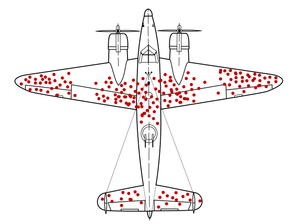
    My first recollection of encountering this phenomenon was the famous (initially counter-intuitive) example of Survivorship Bias – whereby if you look at the damage suffered by Allied planes in WW2 and plot them out you end up with a point diagram that looks somewhat like this:

    Illustration of hypothetical damage pattern on a WW2 bomber. Loosely based on data from an unillustrated report by Abraham Wald (1943), showing that a similar plane survived a single hit to the engine 60% of the time, but a hit to the fuselage or fuel system closer to 95% of the time. Picture is based on US Air Force "hit plots", such as this F-4 hit plot published in 1991. New version by McGeddon based on a Lockheed PV-1 Ventura drawing (2016), vector file by Martin Grandjean (2021).

    Asking where to put more armour plating to increase the chances of the plane coming back home, most people respond with where the red dots are – but of course that’s where the planes that did make it home were already hit. The planes that got hit in the cockpit, the engines, or the fuel tanks were less likely to make it back – so put the additional armour there and more will make it home.

    Not long after, I heard about The Monty Hall Problem and then swiftly after that, The German Tank Problem. (I’ll let you read up on those yourself if you’re not already familiar with them rather than continue to rack up the wordcount).

    I’m not good at maths, or statistics, but these stories always tweaked my imagination as to how someone else could look at these seemingly innocuous (to me) things and intuit a whole other level of meaning that I was completely blind to.

    And then I heard about Acoustic Kitty – the CIA’s attempt to literally bug a cat – which opened up a whole new world of spy craft and madness. Which eventually led me to The Pentagon Pizza Theory – the idea that you could hazard a guess that the US was going to be involved in some international incident based on a sudden late night spike in pizza orders at places near the Pentagon & the Whitehouse.

    These were things of academic interest only really – a kind of “look at these mathematicians in tin-foil hats!” sort of view – until Trump took his second term and started kicking over everyone elses’ sandcastles so that he could try to turn around his polling numbers and make a huge amount of cash on the stock markets on the side. And then suddenly caring about whether the Pentagon were having late night meetings started heavily affecting my pension value as he started abducting foreign leaders – and making it unaffordable to attend graduation because petrol prices doubled almost overnight when he started bombing the Middle East.

    And someone (no doubt one of the aforementioned tin-foil-hat-wearing-mathematicians) put together a dashboard – https://www.pizzint.watch using Google’s “busyness” indicator for fast food joints around the Pentagon and the Whitehouse to keep an eye on it all. Originally it only did pizza joints (staying true to the cause), but over time it has grown to include a number of other OSINT sources.

    I don’t know about you, but I don’t have the time or inclination to have their dashboard up on screen at all hours of the day to review constantly – so I wanted to build an automated monitor for the service instead, to actively alert me to changes.

    And so, finally, we get to the point of this post. I wrote myself a bash file, designed to be run as a Nagios plugin (to make use of my existing setup to send out the alerts whenever things changed). It’s not deep or complicated – I just wanted a quick scrape of the site & receive a nudge when things looked like they might be going sideways.

    #!/usr/bin/env bash
    
    # check_pizza_watch.sh - Monitor PizzInt.Watch for changes to Doughcon
    #
    # -----------------------------------------------------------------------------
    # Description:
    #   This script checks the PizzInt.Watch website to see what the current
    #   "DOUGHCON"[sic] level is. Default is to return CRITICAL if it is at
    #   DOUGHCON 1, WARNING if it is at DOUGHCON 2, or OK at any other level.
    #
    # Example usage:
    #   ./check_pizza_watch.sh
    # #
    # -----------------------------------------------------------------------------
    # Requirements:
    #   • bash 4.x or later (uses associative arrays)
    #   • curl (or wget)
    #
    # -----------------------------------------------------------------------------
    # Author:		Phil Tanner <phil@philtanner.com>
    # Created:		2026-08-29
    # Last updated:		2026-08-29
    #
    # Licence: (MIT licence: https://mit-license.org/)
    # Copyright © 2026 Phil Tanner
    #
    # Permission is hereby granted, free of charge,  to any person obtaining a copy
    # of this software and associated documentation files (the “Software”), to deal
    # in the Software without restriction,  including without limitation the rights
    # to use, copy,  modify, merge,  publish, distribute,  sublicense,  and/or sell 
    # copies of  the  Software,  and to  permit  persons to  whom  the  Software is
    # furnished to do so, subject to the following conditions:
    #
    # The above  copyright notice  and this permission notice shall  be included in
    # all copies or substantial portions of the Software.
    #
    # THE SOFTWARE IS PROVIDED “AS IS”,  WITHOUT  WARRANTY OF ANY KIND,  EXPRESS OR
    # IMPLIED,  INCLUDING  BUT NOT  LIMITED TO THE  WARRANTIES OF  MERCHANTABILITY,
    # FITNESS FOR  A PARTICULAR PURPOSE  AND NONINFRINGEMENT.  IN  NO  EVENT  SHALL
    # THE AUTHORS OR COPYRIGHT HOLDERS BE LIABLE  FOR ANY  CLAIM,  DAMAGES OR OTHER
    # LIABILITY,  WHETHER IN  AN ACTION  OF CONTRACT,  TORT  OR OTHERWISE,  ARISING
    # FROM,  OUT  OF  OR  IN  CONNECTION  WITH  THE  SOFTWARE OR THE  USE  OR OTHER
    # DEALINGS IN THE SOFTWARE.
    #
    # -----------------------------------------------------------------------------
    # Version: 1.0.0
    # -----------------------------------------------------------------------------
    
    # Nagios exit codes
    NAGIOS_OK=0
    NAGIOS_WARNING=1
    NAGIOS_CRITICAL=2
    NAGIOS_UNKNOWN=3
    
    # Default values
    WARNING_VAL=2
    CRITICAL_VAL=1
    TIMEOUT=10
    URL="https://www.pizzint.watch/api/dashboard-data"
    
    # Review arguments
    while getopts "w:c:t:" opt; do
      case $opt in
        w) WARNING_VAL="$OPTARG" ;;
        c) CRITICAL_VAL="$OPTARG" ;;
        t) TIMEOUT="$OPTARG" ;;
        *) echo "Usage: $0 -w <warning> -c <critical> -t <timeout>"; exit $NAGIOS_UNKNOWN ;;
      esac
    done
    
    # Fetch JSON (curl preferred, wget fallback)
    if command -v curl >/dev/null 2>&1; then
        JSON=$(curl -fsS --max-time "$TIMEOUT" "$URL")
        RC=$?
    elif command -v wget >/dev/null 2>&1; then
        JSON=$(wget -q -T "$TIMEOUT" -O - "$URL")
        RC=$?
    else
        echo "UNKNOWN - neither curl nor wget is available"
        exit $NAGIOS_UNKNOWN
    fi
    
    if [ $RC -ne 0 ] || [ -z "$JSON" ]; then
        echo "UNKNOWN - failed to fetch JSON from $URL"
        exit $NAGIOS_UNKNOWN
    fi
    
    # Extract defcon_level (assumes a numeric value)
    DEFCON=$(echo "$JSON" \
        | grep -o '"defcon_level"[[:space:]]*:[[:space:]]*[0-9]\+' \
        | sed 's/[^0-9]//g')
    
    # Check if our DEFCON value is empty
    if [ -z "$DEFCON" ]; then
        echo "UNKNOWN - defcon_level not found in JSON"
        exit $NAGIOS_UNKNOWN
    fi
    
    if [[ "$DEFCON" -le "$CRITICAL_VAL" ]]; then 
        echo "CRITICAL - DOUGHCON level is $DEFCON"
        exit $NAGIOS_CRITICAL
    elif [[ "$DEFCON" -le "$WARNING_VAL" ]]; then
        echo "WARNING - DOUGHCON level is $DEFCON"
        exit $NAGIOS_WARNING
    else
        echo "OK - DOUGHCON level is $DEFCON"
        exit $NAGIOS_OK
    fi

    I have zero idea if this script will be useful to anyone else or not, but as I have a nasty habit of losing my useful scripts, at least I’ll now have this one documented somewhere (thanks Archive.org!)

    Fediverse reactions